
SFTPGo Enterprise v2.7.20260426 is out. The big themes this round: tighter integration of upload validation into the file lifecycle, more from the Event Manager, a WebAdmin that absorbs more day-to-day operations, broader observability, and S3 Object Lock support. Alongside the release, we also rewrote the documentation from scratch and shipped sftpgo-skill, an AI-agent-agnostic reference for Claude, Cursor, Copilot, ChatGPT, and Gemini.
Plug your scanner into the upload pipeline
We added a way to run event actions on the atomic temporary upload file — the one still hidden from clients — and decide whether the upload is promoted to its final path. Use it to wire ICAP antivirus, DLP checks, content validation, or any HTTP webhook directly into the upload itself.
You pick the trade-off per rule:
- Synchronous: the client waits for the action result. The upload completes only if the validation passes.
- Asynchronous: the client gets an immediate OK while the action runs in the background; the file stays invisible to other users until the action finishes.
Works on every storage backend, including S3, Azure Blob, and Google Cloud Storage. Full documentation →
Scheduled Event Reports
We added an Event Report action that aggregates filesystem events per user over a configurable time window, applies action and status filters, and hands the result to any downstream action — most commonly an email with a CSV attachment or an HTTP webhook with structured JSON. Compliance reports, activity digests, and anomaly snapshots without writing custom SQL. Event report reference →
More from the Event Manager
A few smaller improvements landed this round:
- Copy action, fully revamped: optionally delete or atomically move source files
after each successful copy, glob patterns (
/inbox/*.csv), per-file retry (0–5 attempts, 5-second backoff), and continue-on-error so one failed file does not stop the batch. - Filesystem Delete: a trailing
/empties a directory without removing it. - Initiator template variable exposes the User or Admin object that triggered a
provider event; new
fromNanoshelper for nested timestamps. - Path filters still match on the virtual path as before, and can now optionally target the filesystem path too (bucket name, drive letter, UNC path).
Between these and the Event Report action, most bespoke "file shuffling" cron jobs you are keeping around can finally retire.
Tighter share governance
We added an RBAC-style rule that lets administrators define denied share paths (virtual paths users are not allowed to share) and restrict share scopes (read / write / read+write) per user or via groups. When all scopes are denied, sharing is disabled entirely. Useful in regulated environments where certain folders must never leave the secure perimeter via a public link. Restricting shareable paths →
More from the WebAdmin
Several configs that used to require editing config files and restarting or reloading the service now live in the WebAdmin:
- TLS certificates can be uploaded directly from the global configs page, with per-protocol selection (HTTPS, FTPS, WebDAV) and live update without a service restart. As a side benefit, ACME state and account keys now live in the database, making containerized and clustered deployments even simpler and more seamless to set up and manage.
- Email templates for password reset, password expiration, and one-time access codes are now editable from the UI with a visual HTML editor.
- Language configuration — choose which UI languages are enabled system-wide.
A couple more day-to-day quality-of-life additions:
- Test connection button on user, group, and folder edit pages — verifies connectivity, authentication, and configured-path access for remote backends (S3, Google Cloud Storage, Azure Blob, SFTP, FTP, HTTP).
- Password expiration column on the users list — a clear, at-a-glance view that password policies are being enforced across all accounts, along with an easy way to identify users whose credentials are nearing expiration.
Per-user metrics in Grafana
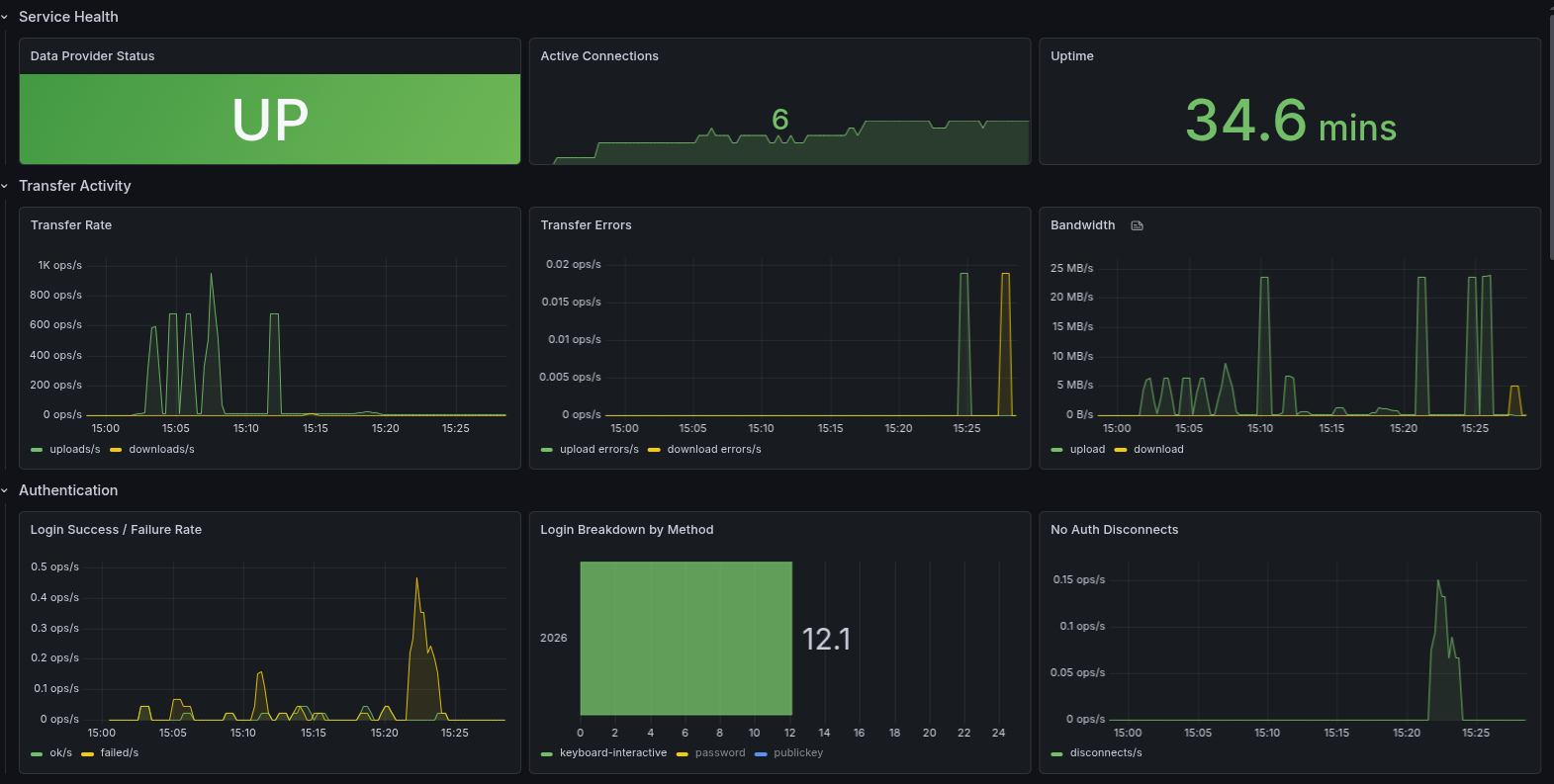
We overhauled the Prometheus metrics. Per-user counters — uploads, downloads, bandwidth, active
sessions, login outcomes — are now exported per username, alongside per-backend transfer counters and
a new sftpgo_fs_ops_total metric that covers rename, delete, rmdir, copy, and mkdir
across all protocols and Event Manager actions. We also published a
ready-to-use Grafana dashboard
on Grafana Labs.
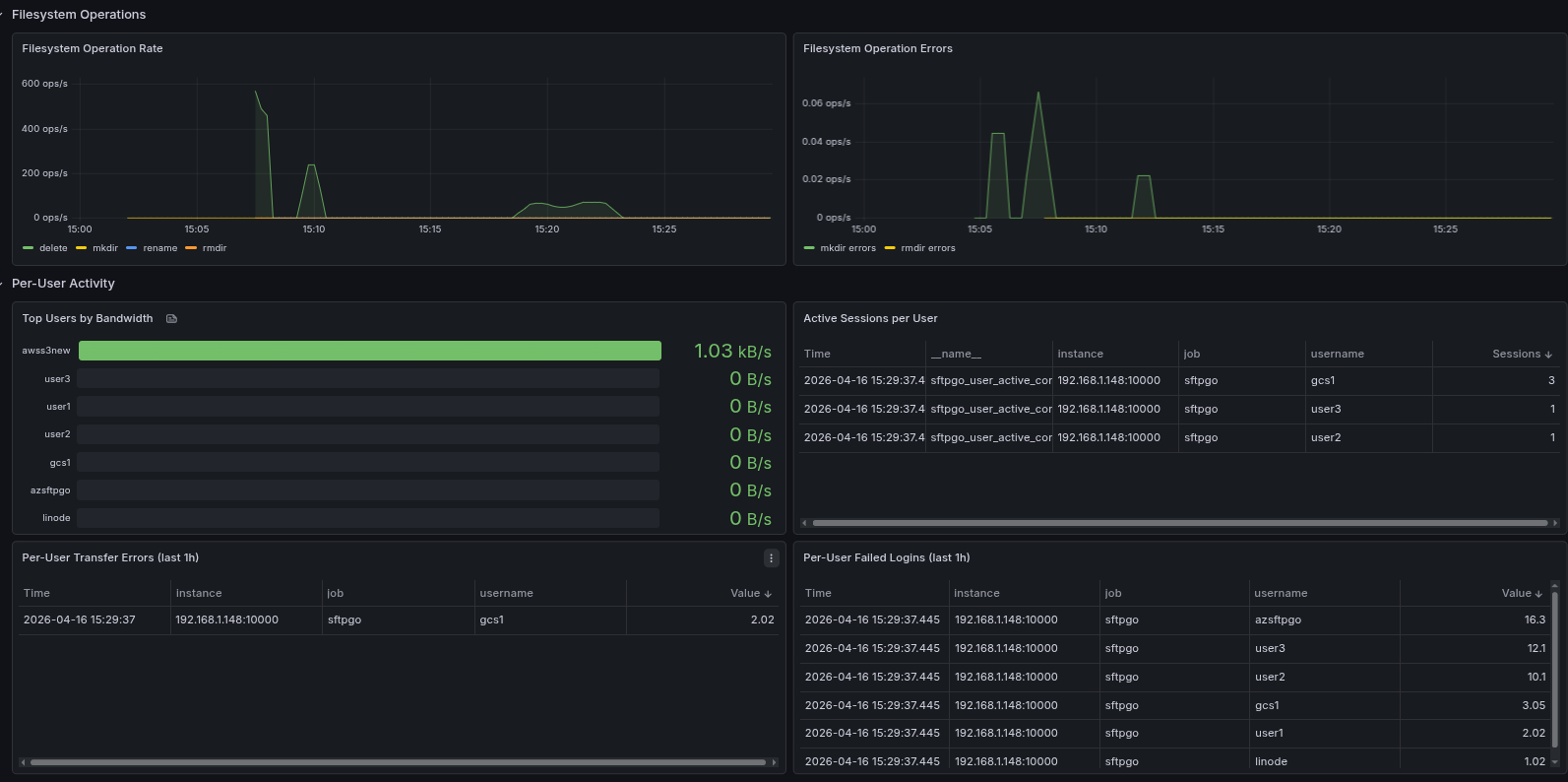
Per-user activity tables make it easy to spot the busiest users, transfer errors, and failed logins at a glance:
Heads up: this is a breaking change for existing dashboards and alerts. See the metrics documentation for the full list of new metric names.
S3 Object Lock support
We added configurable upload checksums to S3 (CRC32, CRC32C, CRC64NVME, SHA1, SHA256) and Azure Blob (CRC64). Beyond payload integrity verification, this unlocks an important use case: S3 buckets with Object Lock enabled require a checksum on every upload, otherwise the operation is rejected. Object Lock is the WORM/immutability primitive used in regulated environments — financial recordkeeping (SEC 17a-4, FINRA), healthcare archives, legal holds — and the same requirement applies to S3-compatible services that implement it. Object Lock and checksums →
PKCE-only OIDC for public clients
Public OAuth2 clients — mobile apps, single-page applications, CLI tools — can't safely store a long-lived client secret on the user device. The OAuth2 best practice for these scenarios (RFC 8252) is to drop the secret entirely and rely on PKCE to protect the authorization code exchange against interception attacks.
We now support PKCE-only authentication in the OIDC integration: omit the client secret in the SFTPGo configuration and the authorization code exchange is secured by PKCE alone. This unlocks integration with identity providers and front-end applications where storing a long-lived secret was previously a blocker.
A complete documentation rewrite
We rewrote the documentation from scratch. Two new top-level helpers keep you oriented: a task-oriented Documentation Map that takes you from "I want to X" directly to the right page, and a Glossary of SFTPGo-specific terms. We wrote brand-new tutorials for the workflows we see most often — ICAP antivirus, PGP encryption, IdP JIT provisioning, data retention, upload notifications with ready-to-paste webhook templates for Slack, Microsoft Teams, Discord, Google Chat, and Mattermost — and every plugin finally has its own page.
sftpgo-skill: stop your AI from guessing field names
We also shipped
sftpgo-skill —
an AI-agent-agnostic reference that teaches Claude Code, Cursor, Copilot, ChatGPT, Gemini, and any
other model how to drive SFTPGo correctly: REST API payloads, WebAdmin forms, Go template authoring
for Event Actions, deployment recipes, and OSS-vs-Enterprise awareness. Drop the single-file
reference.md into a Custom GPT or a Claude Project and your AI stops hallucinating field
names. The
AI Assistants
page has install instructions for every major agent.
Upgrade when you're ready — and let us know what you build with the new pre-publish hooks at support@sftpgo.com.